
Glowing circular digital network with connected data and blockchain symbols

Monthly Maintenance Patching in Oracle Fusion: A DBA‑Focused Overview

Monthly Maintenance Patching in Oracle Fusion: A DBA‑Focused Overview

Monthly maintenance patching is Oracle’s mandatory security and stability cycle for all Fusion SaaS environments, introduced globally in June 2026. This patching program ensures that every customer tenant across ERP, HCM, SCM, and CX receives consistent updates that strengthen security posture, maintain infrastructure health, and align environments for quarterly functional releases.

1. What Monthly Maintenance Entails

It delivers a consolidated set of updates across the entire stack, including security vulnerability fixes, infrastructure hardening, middleware updates, and application‑level enhancements. These patches address zero‑day threats, cloud platform vulnerabilities, performance issues, and configuration drift that naturally occurs in a multi‑tenant environment. Oracle also applies telemetry‑driven fixes based on global error patterns and SR trends, ensuring that recurring issues are resolved proactively.

This maintenance window includes downtime for both non‑production and production environments, along with enforced blackout periods that prevent refreshes from interfering with patch deployment. Because Fusion environments operate in cohorts, monthly maintenance also helps maintain alignment across environments, reducing the risk of inconsistent behavior between DEV, TEST, and PROD.

What this means for your environment(s):

  • There is no change to the Fusion Applications Quarterly Update schedule.
  • If you previously opted in to monthly maintenance, your maintenance schedule on your production environments doesn’t change. However, as of June 2026, you’ll have a second monthly downtime on your non-production environments for maintenance.
  • If you previously opted out of monthly maintenance, you’ll be scheduled for mandatory monthly maintenance starting in June 2026.
  • All environments on a production schedule will receive mandatory monthly maintenance on the weekend of the third Friday of the month, except in Middle East regions, which will receive mandatory monthly maintenance on the third Thursday of the month.
  • All environments on a non-production schedule will receive mandatory monthly maintenance during the week of the third Friday of the month.
  • You’ll receive prior notice before any scheduled downtime, allowing you to plan your activities / refreshes accordingly.
  • If a scheduled refresh conflicts with planned maintenance, Oracle will cancel the refresh to accommodate mandatory monthly maintenance. You’ll need to reschedule the refresh once the mandatory maintenance is complete.
  • Oracle may modify the mandatory monthly maintenance schedule or discontinue monthly maintenance in order to best meet customer needs.

2. Deployment Plan and Operational Impact

Oracle follows a predictable deployment plan: non‑production environments are patched first, followed by production environments. Downtime windows are fixed and cannot be rescheduled, and Oracle typically sends notifications about a week in advance. During the maintenance cycle, refresh blackout periods are enforced to prevent data corruption, cohort misalignment, and patch incompatibility.

For DBAs, this means planning around downtime, adjusting refresh calendars, monitoring integrations after maintenance, and validating environment stability. Monthly maintenance also interacts with weekly patching and quarterly updates, forming a layered patching rhythm. The monthly cycle ensures the platform is secure enough to support quarterly functional updates without introducing instability.

3. Regression Testing Expectations and Final Recommendations

Regression testing is not mandated by Oracle, but it is strongly recommended for any environment with custom roles, complex integrations, or critical business flows. Monthly maintenance can introduce subtle changes in workflows, security policies, integration latency, and backend configurations. Running targeted regression tests such as validating core business flows, checking integration behavior, confirming security role functionality, and reviewing scheduled jobs helps ensure stability after patching.

From a DBA perspective, the best practice is to treat monthly maintenance as a strategic security event rather than a routine patch. Maintain a refresh calendar aligned with blackout windows, document cohort alignment, monitor integrations closely, and run smoke tests within 24 hours of patch completion. This approach ensures your Fusion environment remains secure, compliant, and operationally predictable.

Additional Information

Enable Oracle Database Zero Data Loss Autonomous Recovery Service in OCI (aka ARS)

In today’s cloud-first world, backup is no longer just a checkbox; it’s a core pillar of resilience, compliance, and cybersecurity. Oracle’s Zero Data Loss Autonomous Recovery Service (ZDLARS) delivers a fully managed, centralized, and secure backup solution for Oracle Cloud Infrastructure (OCI) databases.

In this article, we’ll walk through what it is, why it matters, and how to enable it step-by-step.

What Is Zero Data Loss Autonomous Recovery Service?

Oracle Corporation offers Zero Data Loss Autonomous Recovery Service (ZDLARS) as a managed cloud backup and recovery solution designed specifically for Oracle databases running in OCI.

It provides:

  • Always-on encryption (at rest and in transit)
  • Backup storage in a separate fault domain
  • Automated scheduling and lifecycle management
  • Built-in support for governance and compliance standards
  • Ransomware resilience with immutability
  • Zero data loss protection capabilities

Unlike traditional Object Storage–based backups, ZDLARS is purpose-built for Oracle Database recovery performance and security.

Step-by-Step: Enable Autonomous Recovery Service in OCI

Log in to Oracle Cloud Console

  1. Navigate to the OCI Console.
  2. Select your target Database instance.
  3. Open the Backup Configuration section.

Configure Automatic Backups

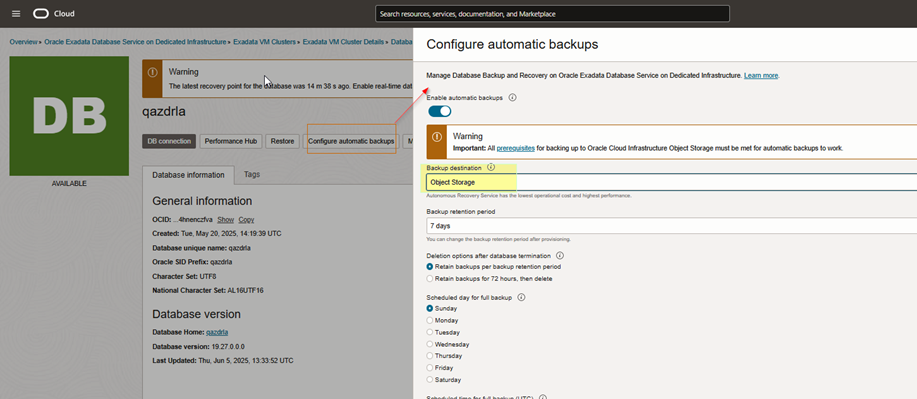
  1. Click Configure Automatic Backups.
  2. If the database is currently configured to use Object Storage, it will be indicated.

This is where you’ll switch to Autonomous Recovery Service.

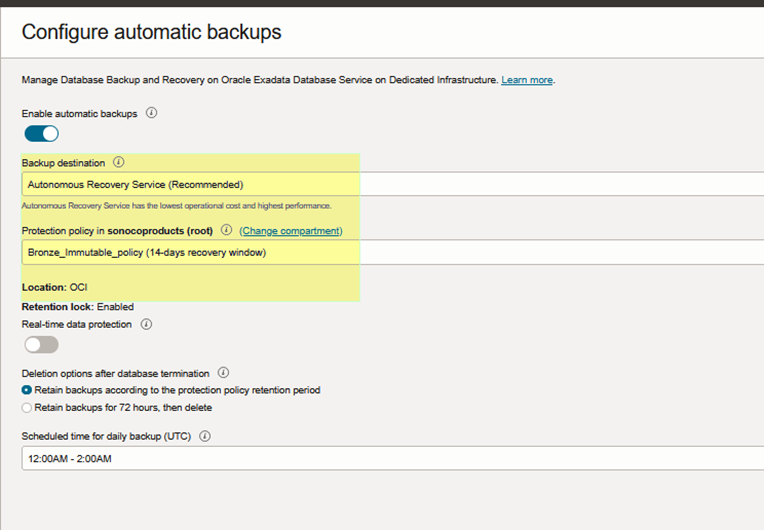
Select Autonomous Recovery Service

Under the backup destination options:

  • Choose Autonomous Recovery Service
  • Select a Custom Retention Policy (recommended for immutability and governance requirements).

NOTE:
Enabling Autonomous Recovery Service will initiate the first backup immediately. The system will then submit a work request to update the database, which may take a couple of hours to complete.

Verification Steps

After enabling the service, verify the backup configuration.

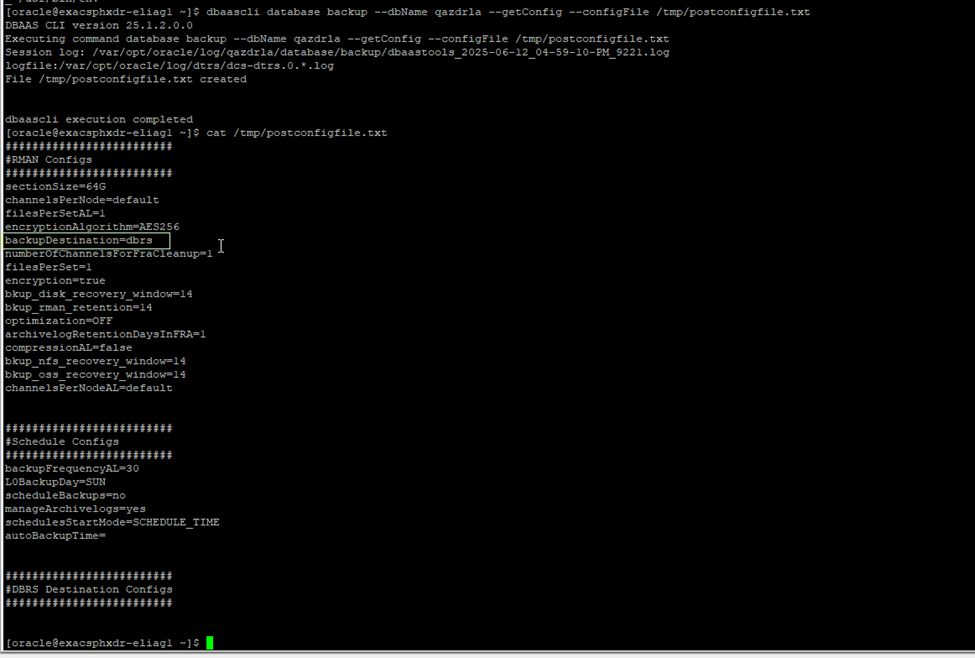
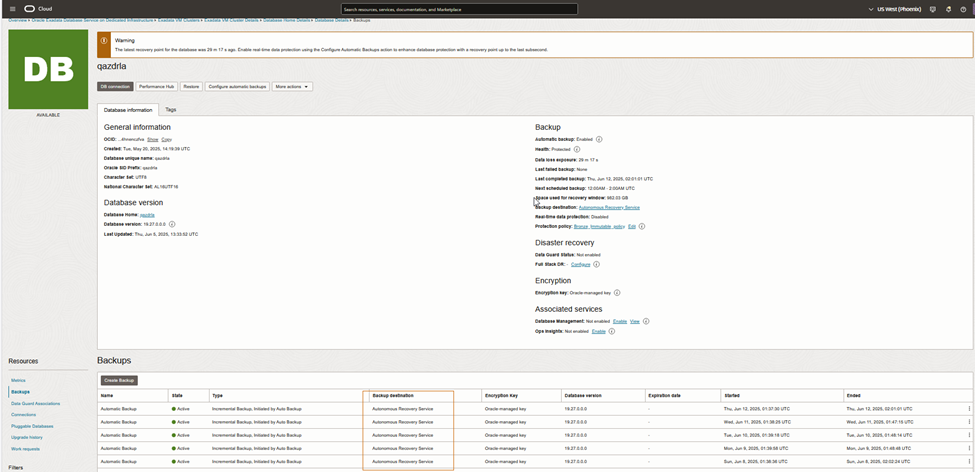
Confirm Backup Destination

Verify that:

  • Backup destination is updated to DBRS (Previously it may have shown: backupDestination=oss)

This confirms the migration from Object Storage to Autonomous Recovery Service.

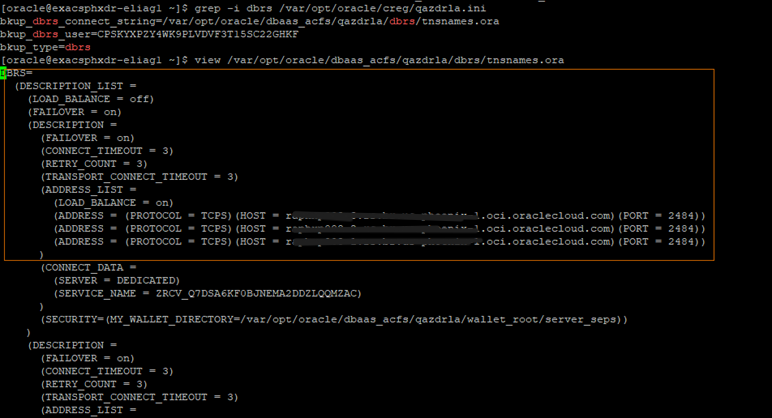
Verify TNS Entries


•	Check if new TNS entries are added for ZDRLA appliances.
•	Look for the following in the TNS admin directory:

IFILE=/var/opt/oracle/dbaas_acfs/qazdrla/dbrs/tnsnames.ora


Presence of this file confirms the database is now configured to use ZDLARS connectivity.

Validate Backup Execution

  1. Navigate to the Backups section.
  2. Confirm new backups are completing successfully under Autonomous Recovery Service.

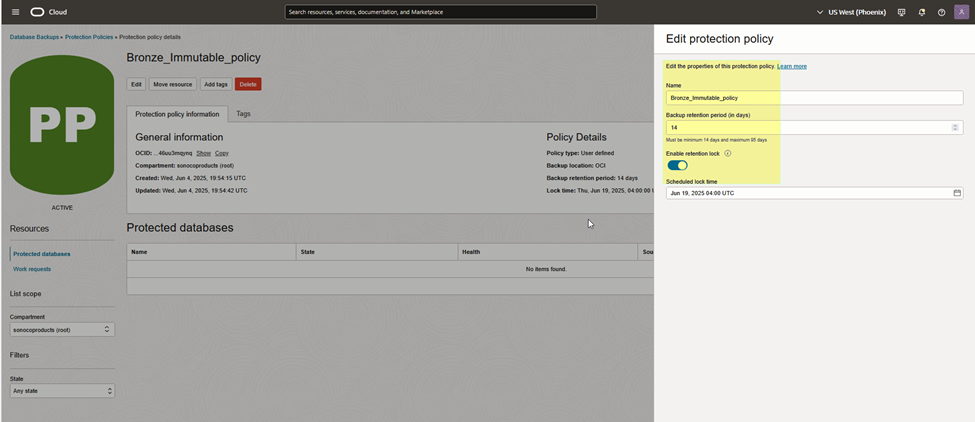
Optional: Enable Retention Lock (Highly Recommended)For enhanced ransomware protection – Immutable Backup

Step 1 – Create a New Backup Policy

  1. Go to Backup Policies
  2. Create a new policy
  3. Enable Retention Lock

Retention Lock ensures:

  • Backups cannot be modified
  • Backups cannot be deleted
  • Protection remains enforced until retention period expires

Step 2 – Apply the Policy

Assign the retention-locked policy to your database backup configuration.

This is especially critical for:

  • Healthcare organizations
  • Financial services
  • Regulated industries
  • Enterprises concerned about insider threats

Why This Matters

Traditional backups protect against hardware failure.
ZDLARS protects against:

  • Ransomware attacks
  • Insider threats
  • Accidental deletion
  • Regulatory non-compliance
  • Data corruption

By separating backup storage into an isolated fault domain and enforcing immutability, Oracle significantly reduces recovery risk.

Final Thoughts

Enabling Zero Data Loss Autonomous Recovery Service is one of the most impactful security upgrades you can implement in OCI for Oracle databases. It transforms backup from a passive safety measure into an active cyber-resilience strategy.

If you’re managing production workloads in OCI, especially mission-critical systems, this configuration should be part of your standard database hardening checklist.

Source

Overview of Oracle Database Autonomous Recovery ServiceZero Data Loss Recovery | OracleIntroducing the Oracle Database Zero Data Loss Autonomous Recovery Service

AWS Cloud and Oracle Database

Amazon Web Services (AWS) provides 2 types of services.

  1. Amazon Relational Database Service (RDS) which is fully managed service. Few clicks you got the Database up and running and scalable with few clicks. All the backup’s, patching, storage and high availability are managed by AWS.
  2. Amazon Elastic Compute Cloud (EC2) allows full control over setup of infrastructure and database. So we will be in charge of backup’s, patches, storage provisioning…etc.

There are 2 options of pricing, one with Amazon’s Oracle license included and the other with Bring your own license. Prices are reasonable and it’s per hour usage. https://aws.amazon.com/rds/oracle/pricing/

Amazon RDS and EC2 Available for Oracle, MySql, Sql server. OS, Linux, RHEL, SLES, Windows, SQL are available.

Amazon Relational Database Service (RDS) is a managed database service. RDS makes it easy to set up, operate, and scale Oracle Database deployments in the cloud. With Amazon RDS, you can deploy multiple editions of Oracle Database in minutes with cost-efficient and re-sizable hardware capacity. Amazon RDS frees you up to focus on application development by managing time-consuming database administration tasks including provisioning, backups, software patching, monitoring, and hardware scaling.

Amazon EC2, has 3 types of pricing involved depending on the type of instance you choose (On-demand, Reserved, and Spot Instances) and all are pay for what you use method.

AWS free usage FAQ – https://aws.amazon.com/free/faqs/

Attached are 2 examples of Oracle DB setup using EC2 and RDS. Also attached few PDF for reference.

Create instance in EC2 in AWSCreate Oracle RDS instance in Amazon

Create Oracle RDS instance in Amazon