Passwordless SSH connection setup between Linux Nodes

What is SSH: Secure Shell (SSH) is an open source cryptographic network protocol for operating network services securely over an unsecured network. The best-known example application is for remote login to computer systems by users. SSH provides a secure channel over an unsecured network in a client-server architecture, connecting an SSH client application with an SSH server.

What is SSH-KEYGEN: ssh-keygen is a standard component of the Secure Shell (SSH) protocol suite found on Unix and Unix-like computer systems used to establish secure shell sessions between remote computers over insecure networks, through the use of various cryptographic techniques. The ssh-keygen utility is used to generate, manage, and convert authentication keys. ssh-keygen is able to generate a key using one of three different digital signature algorithms.

Test Case: In our example, we will setup SSH password-less automatic login from server user1@tstserver001 to server user2stserver002
SSH Client: user1@tstserver001
SSH Remote Host: user2stserver002

  1. Frist attempt to log in without setting up SSH keys, we will be prompted for the password.

ssh1


Now let’s create a SSH Key on user1@tstserver001

ssh2.jpg

 Now that our Public Key has been created (/home/user1/.ssh/id_rsa.pub), we can now upload that to any node to setup Password-less connection.

2. Create .SSH directory on user2@tstserver2 if it doesn’t exist.

ssh3.jpg

3. Upload and append the Public Key (id_rsa.pub) on server user2@tstserver2

ssh4.jpg

4. Set Permissions on Remote Host (user2@tstserver002)

ssh5.jpg


  • Alternate ways to do Step 3 and 4, you also Secure Copy the Public Key (id_rsa.pub) file and then append.ssh6.jpg

5. Test Logging in from [user1@tstserver001]$ to [user2@tstserver002]

From now, you can log in to [user2@tstserver002] from [user1@tstserver001] without the password.

ssh7.jpg


How to enable Diagnostics in Oracle Applications R12

Users may not able to able to see Help >Diagnostics option or get an error “Function Not Available to this Responsibility. Please check with your system administrator.”

These profiles need to be set at user level. So specific user can access this functionality (ex. Support folks/Developers)

Navigation: Go to System Administrator responsibility
Profile> System

Profile Option Name: Utilities:Diagnostics
User Level: Yes

diag2.jpg

Profile Option Name: Hide Diagnostics menu entry
User Level: NO

diag1.jpg
Save changes
Have user logout of Oracle Application and login again

User should be able to access Help >Diagnostics Menu

diag3.jpg


Concurrent program to bounce Mobile Warehouse Applications (MWA)

Scope: Create a Concurrent program to bounce Mobile Warehouse Applications (MWA)

Shell Program for MWA Bounce on the Server

First, create a shell script on the Application server.

 #!/bin/bash
# mwa_bounce.sh 03/29/2016 RG

echo “Following are System Parameters”
echo “~~~~~~~~~~~~~~~~~~~~~~~~~~~~~~~”
p0=$0
p1=$1
p2=$2
p3=$3
p4=$4
echo “1st System Parameter :”$p0
#echo “2nd System Parameter :”$p1
echo “3rd System Parameter :”$p2
echo “4th System Parameter :”$p3
echo “5th System Parameter :”$p4
echo “~~~~~~~~~~~~~~~~~~~~~~~~~~~~~~~”
echo “Following are User Parameters “
echo “~~~~~~~~~~~~~~~~~~~~~~~~~~~~~~~”
#u1=$5
#echo “1st User Parameter :”$u1
echo “~~~~~~~~~~~~~~~~~~~~~~~~~~~~~~~”

echo “Stopping MWA Server via “$p0
echo
nohup $ADMIN_SCRIPTS_HOME/mwactlwrpr.sh stop $p1
echo $ADMIN_SCRIPTS_HOME/mwactlwrpr.sh stop APPS

mail -s “Concurrent Request “$p4” Submitted to Bounce MWA by “$p3 ramesh.ganesan@mycompany.com< /dev/null

sleep 30

# Kill MWADIS

for pids in `ps -fu appldev|grep MWADIS|grep -v “grep”|awk ‘{print $2}’`
do
echo “forcing kill on MWADIS PID ${pids}”
kill -9 ${pids}
done

# Kill telnet
for pids in `ps -fu appldev|grep telnet|grep -v “grep”|awk ‘{print $2}’`
do
#DTL=`ps -fu appldev|grep telnet|grep -v “grep”|awk ‘{print $15}’` # 11i
DTL=`ps -fu appldev|grep telnet|grep -v “grep”|awk ‘{print $17}’` # R12.2
echo “forcing kill on PID ${pids} for ${DTL}”
kill -9 ${pids}
done

sleep 30

echo “Starting MWA Server via “$p0
echo $ADMIN_SCRIPTS_HOME/mwactlwrpr.sh start APPS
echo
rm -rf /tmp/mwa_alert.txt
touch /tmp/mwa_alert.txt
nohup $ADMIN_SCRIPTS_HOME/mwactlwrpr.sh start $p1 |tee /tmp/mwa_alert.txt

# if the dispatcher isn’t free, email me

MWAERROR=`cat /tmp/mwa_alert.txt | grep “is not free to start the dispatcher”`

if [ ! -z “$MWAERROR” ]
then
echo $MWAERROR | mail -s “MWA Error” ramesh.ganesan@brakepartsinc.com
fi

Copy the program to $CUSTOM_TOP/bin and create Soft link

cd $XXBPI_TOP/bin
[appldev@uswodapp013 bin]$ ln -s /ua4001/appl/fnd/12.0.0/bin/fndcpesr mwa_bounce

Create Concurrent Program Executable

As SYSADMIN, define the Executable via Concurrent->Program->Executable

mwa1

Create Concurrent Program Definition

sysadmin, define the Executable via Concurrent->Program->Define

mwa2

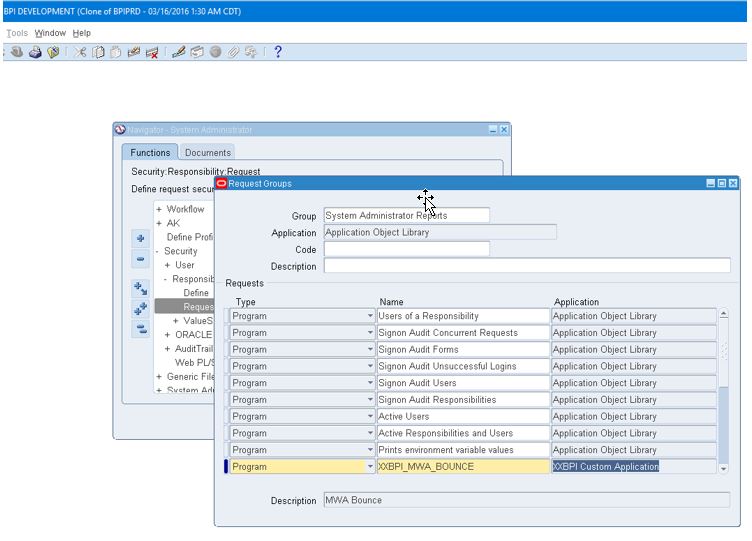
Assign a Request Group

Security->Responsibility->Request

mwa3

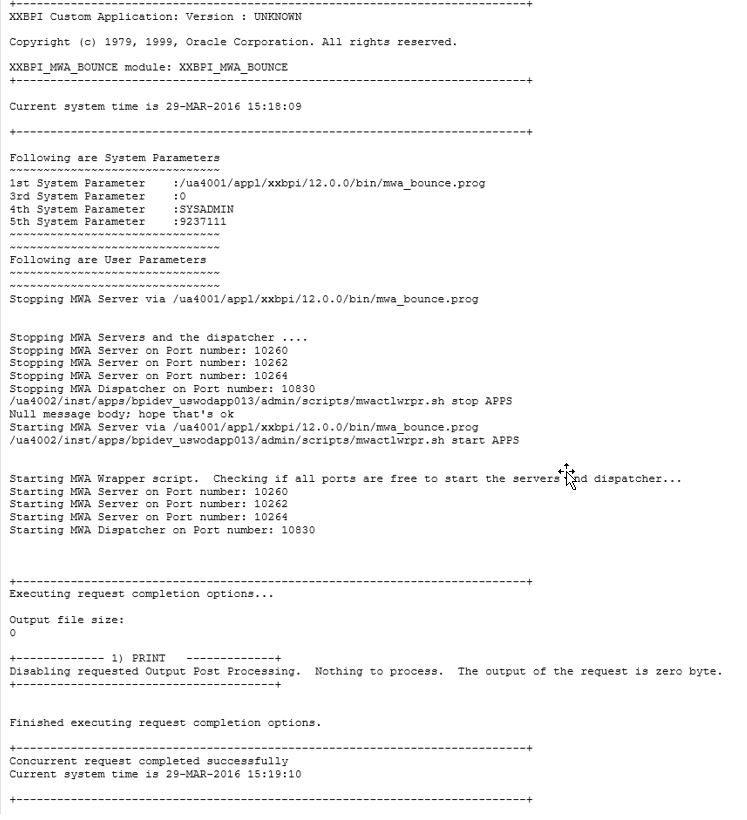
Submit the Request and view Log file and verify Email

mwa4


Log file

mwa5

Email output

mwa6

Program Definition and Request Group can be downloaded and uploaded to other EBS instances with MWA

Program Definition Download

FNDLOAD apps/apps O Y DOWNLOAD $FND_TOP/patch/115/import/afcpprog.lct xxbpi_mwa_bounce_prgm.ldt PROGRAM APPLICATION_SHORT_NAME=”XXBPI_MWA_BOUNCE” CONCURRENT_PROGRAM_NAME=”XXBPI_MWA_BOUNCE”

Upload

FNDLOAD apps/apps O Y UPLOAD $FND_TOP/patch/115/import/afcpprog.lct xxbpi_mwa_bounce_prgm.ldt

Request Group Download

FNDLOAD apps/apps O Y DOWNLOAD $FND_TOP/patch/115/import/afcpreqg.lct xxbpi_system_admin_reports_reqgrp.ldt REQUEST_GROUP REQUEST_GROUP_NAME=”System Administrator Reports” APPLICATION_SHORT_NAME=”FND”

Upload

FNDLOAD apps/apps O Y UPLOAD $FND_TOP/patch/115/import/afcpreqg.lct xxbpi_system_admin_reports_reqgrp.ldt

R12-Increase Java Heap Size and JVM

Current Settings

[applmgr@uswodapq03 scripts]$ ./adoacorectl.sh status | grep “OC4J:oacore” | awk -F”|” ‘{print $3}’ | while read L ; do ps -fp $L | grep -v PID ; done | awk -F”-X” ‘{print $2 $3}’
mx512M ms128M

Shows we have 1 JVM with 512 as MX and 128 as MS.

Scope is to increase the JVM to 2 and Increase the Memory size.

Steps – Modify $Context_File

[applmgr@uswodapq03 ~]$ grep oacore_nprocs $CONTEXT_FILE
<oacore_nprocs oa_var=”s_oacore_nprocs”>1</oacore_nprocs>

[applmgr@uswodapq03 ~]$ grep s_oacore_jvm_start_options $CONTEXT_FILE
<oacore_jvm_start_options oa_var=”s_oacore_jvm_start_options”>-server -verbose:gc -Xmx512M -Xms128M -XX:MaxPermSize=160M -XX:NewRatio=2 -XX:+PrintGCTimeStamps -XX:+UseTLAB -XX:+UseParallelGC -XX:ParallelGCThreads=2 -Dcom.sun.management.jmxremote -Djava.security.policy=$ORACLE_HOME/j2ee/oacore/config/java2.policy -Djava.awt.headless=true -Dhttp.webdir.enable=false -Doracle.security.jazn.config=/ebsqa/applmgr/inst/apps/ebsqa_uswodapq03/ora/10.1.3/j2ee/oacore/config/jazn.xml</oacore_jvm_start_options>

—–change the heap size as below and increase jvm to 2.
-Xmx1024M -Xms512M -XX:MaxPermSize=256M

[applmgr@uswodapq03 admin]$ grep s_oacore_jvm_start_options $CONTEXT_FILE
<oacore_jvm_start_options oa_var=”s_oacore_jvm_start_options”>-server -verbose:gc -Xmx1024M -Xms512M -XX:MaxPermSize=256M -XX:NewRatio=2 -XX:+PrintGCTimeStamps -XX:+UseTLAB -XX:+UseParallelGC -XX:ParallelGCThreads=2 -Dcom.sun.management.jmxremote -Djava.security.policy=$ORACLE_HOME/j2ee/oacore/config/java2.policy -Djava.awt.headless=true -Dhttp.webdir.enable=false -Doracle.security.jazn.config=/ebsqa/applmgr/inst/apps/ebsqa_uswodapq03/ora/10.1.3/j2ee/oacore/config/jazn.xml</oacore_jvm_start_options>

[applmgr@uswodapq03 admin]$ grep oacore_nprocs $CONTEXT_FILE
<oacore_nprocs oa_var=”s_oacore_nprocs”>2</oacore_nprocs>

Stop and Start Application Services

cd $ADMIN_SCRIPTS_HOME
./adautocfg.sh

adopmnctl.sh stopall
adopmnctl.sh startall

After Changes- increased Heap memory with 2 JVM
[applmgr@uswodapq03 scripts]$ ./adoacorectl.sh status | grep “OC4J:oacore” | awk -F”|” ‘{print $3}’ | while read L ; do ps -fp $L | grep -v PID ; done | awk -F”-X” ‘{print $2 $3}’
mx1024M ms512M
mx1024M ms512M
Emergency fix – quick solution
Just in case you need to fix an issue quickly, you may want to edit $INST_TOP/ora/10.1.3/opmn/conf/opmn.xml file directly and restart OPMN processes to enable new parameters.

<data id=”java-options” value=”-server -verbose:gc -Xmx1024M -Xms512M -XX:MaxPermSize=256M -XX:NewRatio=2 -XX:+PrintGCTimeStamps -XX:+Use
TLAB -XX:+UseParallelGC -XX:ParallelGCThreads=2 -Dcom.sun.management.jmxremote -Djava.security.policy=$ORACLE_HOME/j2ee/oacore/config/java2.policy -Djava.awt
.headless=true -Dhttp.webdir.enable=false -Doracle.security.jazn.config=/ebsqa/applmgr/inst/apps/ebsqa_uswodapq03/ora/10.1.3/j2ee/oacore/config/jazn.xml -Dhttp
.cookie.ignoreCommaInCookiesNamed=X_NoMatchingCookies”/>

<process-type id=”oacore” module-id=”OC4J” status=”enabled” working-dir=”$ORACLE_HOME/j2ee/home”>
<process-set id=”default_group” numprocs=”2″/>
Make sure to edit $CONTEXT_FILE to keep it in sync.

EBS R12 – OPP Out of Memory Error

Cause: Oracle EBS Reports are ending in Warning.
Concurrent Logs having an OPP error:

+—————————————————————–+
Executing request completion options…
Output file size: 4323
+————- 1) PUBLISH ————-+
Unable to find an Output Post Processor service to post-process request 10225428. Check that the Output Post Processor service is running.
+————————————–+

+————- 2) PRINT ————-+
Not printing the output of this request because post-processing failed.
+————————————–+
Finished executing request completion options.
+—————————————————————–+

Check the Concurrent OPP Logs.

NOTE: If 2 threads enabled, then there will be 2 log files.

Logfile Location:

ls -ltr $APPLCSF/$APPLLOG/FNDOPP*
FNDOPP74655.txt
FNDOPP74654.txt

OR

ps -ef | grep OPP

applebs 15024 6778 17 13:00 ? 00:04:32 /us1001/product/10.1.3/appsutil/jdk/bin/java -DCLIENT_PROCESSID=15024 -server -Xmx384m -XX:NewRatio=2 -XX:+UseSerialGC -Doracle.apps.fnd.common.Pool.leak.mode=stderr:off -verbose:gc -mx2048m -Ddbcfile=/ua1002/inst/apps/bpiprd_uswodapp002/appl/fnd/12.0.0/secure/bpiprd.dbc -Dcpid=74654 -Dconc_queue_id=6269 -Dqueue_appl_id=0 –Dlogfile=/ua1002/inst/apps/bpiprd_shared/logs/appl/conc/log/FNDOPP74654.txt –DLONG_RUNNING_JVM=true -DOVERRIDE_DBC=true -DFND_JDBC_BUFFER_MIN=1 -DFND_JDBC_BUFFER_MAX=2 oracle.apps.fnd.cp.gsf.GSMServiceController

applebs 15026 6778 4 13:00 ? 00:01:15 /us1001/product/10.1.3/appsutil/jdk/bin/java -DCLIENT_PROCESSID=15026 -server -Xmx384m -XX:NewRatio=2 -XX:+UseSerialGC -Doracle.apps.fnd.common.Pool.leak.mode=stderr:off -verbose:gc -mx2048m dbcfile=/ua1002/inst/apps/bpiprd_uswodapp002/appl/fnd/12.0.0/secure/bpiprd.dbc -Dcpid=74655 -Dconc_queue_id=6269 -Dqueue_appl_id=0 –Dlogfile=/ua1002/inst/apps/bpiprd_shared/logs/appl/conc/log/FNDOPP74655.txt -DLONG_RUNNING_JVM=true -DOVERRIDE_DBC=true -DFND_JDBC_BUFFER_MIN=1 -DFND_JDBC_BUFFER_MAX=2 oracle.apps.fnd.cp.gsf.GSMServiceController

Log has following errors.

[5/18/16 12:57:04 PM] [UNEXPECTED] [74607:RT10225399] java.lang.OutOfMemoryError: Java heap space
at java.lang.Class.getDeclaredMethods0(Native Method)
at java.lang.Class.privateGetDeclaredMethods(Class.java:2427)
at java.lang.Class.getDeclaredMethod(Class.java:1935)
at java.io.ObjectStreamClass.getPrivateMethod(ObjectStreamClass.java:1382)
at java.io.ObjectStreamClass.access$1700(ObjectStreamClass.java:52)
at java.io.ObjectStreamClass$2.run(ObjectStreamClass.java:438)
at java.security.AccessController.doPrivileged(Native Method)
at java.io.ObjectStreamClass.<init>(ObjectStreamClass.java:413)
at java.io.ObjectStreamClass.lookup(ObjectStreamClass.java:310)
at java.io.ObjectOutputStream.writeObject0(ObjectOutputStream.java:1106)
at java.io.ObjectOutputStream.defaultWriteFields(ObjectOutputStream.java:1509)
at java.io.ObjectOutputStream.writeSerialData(ObjectOutputStream.java:1474)
at java.io.ObjectOutputStream.writeOrdinaryObject(ObjectOutputStream.java:1392)
at java.io.ObjectOutputStream.writeObject0(ObjectOutputStream.java:1150)
at java.io.ObjectOutputStream.defaultWriteFields(ObjectOutputStream.java:1509)
at java.io.ObjectOutputStream.writeSerialData(ObjectOutputStream.java:1474)
at java.io.ObjectOutputStream.writeOrdinaryObject(ObjectOutputStream.java:1392)
at java.io.ObjectOutputStream.writeObject0(ObjectOutputStream.java:1150)
at java.io.ObjectOutputStream.writeObject(ObjectOutputStream.java:326)
at oracle.ias.cache.group.HttpPacket.<init>(Unknown Source)
at oracle.ias.cache.group.StreamHandler.write(Unknown Source)
at oracle.ias.cache.group.EndPoint.write(Unknown Source)
at oracle.ias.cache.group.Transport.syncSend(Unknown Source)
at oracle.ias.cache.group.Sender.execute(Unknown Source)
at oracle.ias.cache.group.Sender.run(Unknown Source)

Troubleshooting

Option 1, patching

12i Environments:
1. Please download,review and apply Patch 7687414 in a test environment.
3. Please retest the issue.
4. If the issue is resolved, please migrate the solution as appropriate to other environments.

Option 2, Increase the maximum Java heap size for the OPP to 1024MB (1GB):

Determine what the heap size per OPP process is currently:

select DEVELOPER_PARAMETERS from FND_CP_SERVICES
where SERVICE_ID = (select MANAGER_TYPE from FND_CONCURRENT_QUEUES
where CONCURRENT_QUEUE_NAME = ‘FNDCPOPP’);

-The default should be:

J:oracle.apps.fnd.cp.gsf.GSMServiceController:-mx512m

3. Increase the Heap Space per Process to 1024:

update FND_CP_SERVICES
set DEVELOPER_PARAMETERS =
‘J:oracle.apps.fnd.cp.gsf.GSMServiceController:-mx1024m
where SERVICE_ID = (select MANAGER_TYPE from FND_CONCURRENT_QUEUES
where CONCURRENT_QUEUE_NAME = ‘FNDCPOPP’);
OR
1. Log into applications with the System Administrator responsibility.
2. Navigate to Concurrent -> Program -> Define
3. Query the XML Publisher Template Re-Generator program
4. Set the following value for the Executable Options : -Xmx1024m
5. Save changes.
6. Retest the program.
The OPP queue can be Recreated the using $FND_TOP/patch/115/sql/afopp002.sql file as ‘APPLSYS’ user. On running the script you will be prompted for username and password.
Option 3, Check timeout settings.
There are two new profiles options that can be used to control the timeouts:
Profile Option : Concurrent:OPP Response Timeout Internal Name : CONC_PP_RESPONSE_TIMEOUT Description : Specifies the amount of time a manager waits for OPP to respond to its request for post processing.
Profile Option : Concurrent:OPP Process Timeout Internal Name : CONC_PP_PROCESS_TIMEOUT Description : Specifies the amount of time the manager waits for the OPP to actually process the request.
Option 4,  Configure the XML Publisher Administrator Configuration settings.
Note: Reports built with large images will require additional space.  So please insure there is adequate temp space and your code is optimized when running large reports/templates.
1. As XML Publisher Administrator navigate to Administration->Configuration.
2. Under Temporary Directory pick a temporary file location on your concurrent processing node. This should be at least 5GB or 20x larger than largest XML data file you generate
3.  Under FO Processing, set:
o Use XML Publisher’s XSLT processor set to True
o Enable scalable feature of XSLT processor set to False
o Enable XSLT runtime optimization set to True
Bounce OPP processes.
Additional Info: Review below Meta link Documents.
Doc ID 1268217.1
Doc ID 862644.1]
Doc ID 1266368.1
Doc ID 427233.1
Doc ID 352518.1
Doc ID 978495.1

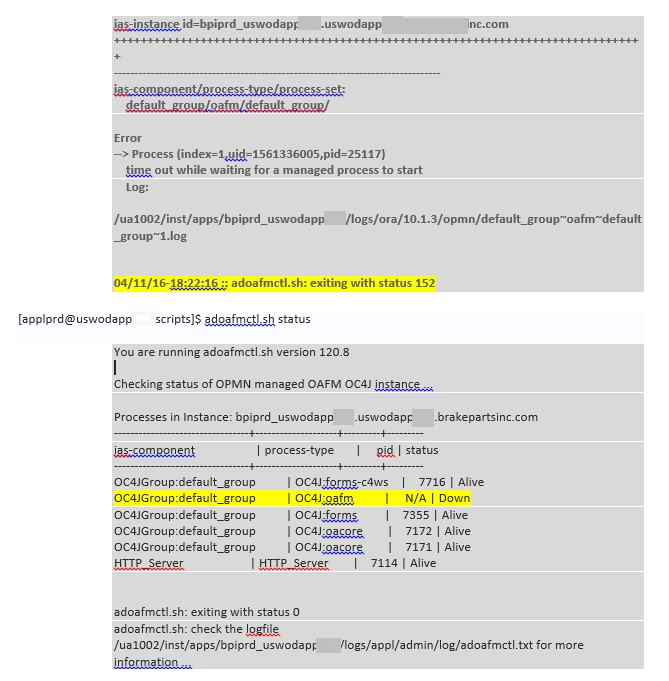
Unable to start OAFM service (time out while waiting for a managed process to start) exiting with status 152

Review below MOS Docs

OC4J Fails to startup with “ERROR Failed to set the internal configuration of the OC4J JMS Server” (Doc ID 372412.1)
OAFM OC4J is Not Starting. Error: “time out while waiting for a managed process to start” (Doc ID 952583.1)

Check Log files under ($LOG_HOME/ora/10.1.3/opmn)
and below logs.

$LOG_HOME/ora/10.1.3/j2ee/oafm/oafm_default_group_1/application.log
$LOG_HOME/ora/10.1.3/j2ee/oafm/oafm_default_group_1/server.log
$LOG_HOME/ora/10.1.3/opmn/default_group~oafm~default_group~1.log
$LOG_HOME/ora/10.1.3/opmn/oafm_default_group_1/oafmstd.out
$LOG_HOME/ora/10.1.3/opmn/oafm_default_group_1/oafmstd.err
$LOG_HOME/appl/admin/log/adoafmctl.txt
2017-09-14_111520

2017-09-14_111850

Issue resolved after doing below actions:

Clear the TLD cache:

  1. Stop all middle tier services
  2. Delete/backup all the files under directory:

$COMMON_TOP/_TldCache
$ORA_CONFIG_HOME/10.1.3/j2ee/oafm/persistence

cd $COMMON_TOP
mv $COMMON_TOP/_TldCache /home/applprd/oafm_log_backup041116/

  1.      cd $ORA_CONFIG_HOME/10.1.3/j2ee/oafm/
    mv persistence /home/applprd/oafm_log_backup041116/

3. start all middle tier services

cd $ADMIN_SCRIPTS_HOME
$ adoafmctl.sh stop
$ adoafmctl.sh start
$ adoacorectl.sh stop
$ adoacorectl.sh start

$ adopmnctl.sh status” You should see all as “Alive”

AWS Cloud and Oracle Database

Amazon Web Services (AWS) provides 2 types of services.

  1. Amazon Relational Database Service (RDS) which is fully managed service. Few clicks you got the Database up and running and scalable with few clicks. All the backup’s, patching, storage and high availability are managed by AWS.
  2. Amazon Elastic Compute Cloud (EC2) allows full control over setup of infrastructure and database. So we will be in charge of backup’s, patches, storage provisioning…etc.

There are 2 options of pricing, one with Amazon’s Oracle license included and the other with Bring your own license. Prices are reasonable and it’s per hour usage. https://aws.amazon.com/rds/oracle/pricing/

Amazon RDS and EC2 Available for Oracle, MySql, Sql server. OS, Linux, RHEL, SLES, Windows, SQL are available.

Amazon Relational Database Service (RDS) is a managed database service. RDS makes it easy to set up, operate, and scale Oracle Database deployments in the cloud. With Amazon RDS, you can deploy multiple editions of Oracle Database in minutes with cost-efficient and re-sizable hardware capacity. Amazon RDS frees you up to focus on application development by managing time-consuming database administration tasks including provisioning, backups, software patching, monitoring, and hardware scaling.

Amazon EC2, has 3 types of pricing involved depending on the type of instance you choose (On-demand, Reserved, and Spot Instances) and all are pay for what you use method.

AWS free usage FAQ – https://aws.amazon.com/free/faqs/

Attached are 2 examples of Oracle DB setup using EC2 and RDS. Also attached few PDF for reference.

Create instance in EC2 in AWSCreate Oracle RDS instance in Amazon

Create Oracle RDS instance in Amazon

adautocfg.sh and adcfglonce.pl dbconfig – fails with ORA-01157 Lock Datafile

When executed Auto config  and Clone Config after RMAN Duplicate, following error occured.

ERROR: InDbCtxFile.uploadCtx() : Exception : Error executng BEGIN fnd_gsm_util.append_ctx_fragment(:1,:2,:3); END;: 1; Oracle error -1157: ORA-01157: cannot identify/lock data file 515 – see DBWR trace file
ORA-01110: data file 515: ‘+USUAT_DATA’ has been detected in FND_GSM_UTIL.APPEND_CTX_FRAGMENT.oracle.apps.ad.autoconfig.oam.InDbCtxFileException: Error executng BEGIN fnd_gsm_util.append_ctx_fragment(:1,:2,:3); END;: 1; Oracle error -1157: ORA-01157: cannot identify/lock data file 515 – see DBWR trace file
ORA-01110: data file 515: ‘+USUAT_DATA’ has been detected in FND_GSM_UTIL.APPEND_CTX_FRAGMENT.


[orajzuat@usuatsrvdbd1bin]$ export PATH=/usr/bin:$PATH
[orajzuat@usuatsrvdbd1bin]$ perl adcfgclone.pl dbconfig /us9001/oracle/11.2.0/appsutil/bpijzuat_usuatsrvdbd1.xml

Beginning dbconfig Apply – Fri Jan 29 14:53:12 2016
…….
  |     30% completed       ERROR: InDbCtxFile.uploadCtx() : Exception : Error executng BEGIN fnd_gsm_util.append_ctx_fragment(:1,:2,:3); END;: 1; Oracle error -1157: ORA-01157: cannot identify/lock data file 515 – see DBWR trace file
ORA-01110: data file 515: ‘+USUAT_DATA’ has been detected in FND_GSM_UTIL.APPEND_CTX_FRAGMENT.
oracle.apps.ad.autoconfig.oam.InDbCtxFileException: Error executng BEGIN fnd_gsm_util.append_ctx_fragment(:1,:2,:3); END;: 1; Oracle error -1157: ORA-01157: cannot identify/lock data file 515 – see DBWR trace file
ORA-01110: data file 515: ‘+USUAT_DATA’ has been detected in FND_GSM_UTIL.APPEND_CTX_FRAGMENT.
        at oracle.apps.ad.autoconfig.oam.InDbCtxFile.uploadCtx(InDbCtxFile.java:249)
        at oracle.apps.ad.autoconfig.oam.CtxSynchronizer.uploadToDb(CtxSynchronizer.java:328)
        at oracle.apps.ad.tools.configuration.FileSysDBCtxMerge.updateDBCtx(FileSysDBCtxMerge.java:721)
        at oracle.apps.ad.tools.configuration.FileSysDBCtxMerge.updateDBFiles(FileSysDBCtxMerge.java:226)
        at oracle.apps.ad.context.CtxValueMgt.processCtxFile(CtxValueMgt.java:1690)
        at oracle.apps.ad.clone.ApplyDatabase.runCVM(ApplyDatabase.java:3058)
        at oracle.apps.ad.clone.ApplyDatabase.runCVMAndAutoConfig(ApplyDatabase.java:3003)
        at oracle.apps.ad.clone.ApplyDatabase.doConf(ApplyDatabase.java:649)
        at oracle.apps.ad.clone.ApplyDatabase.doApply(ApplyDatabase.java:473)
        at oracle.apps.ad.clone.ApplyDatabase.<init>(ApplyDatabase.java:366)
        at sun.reflect.NativeConstructorAccessorImpl.newInstance0(Native Method)
        at sun.reflect.NativeConstructorAccessorImpl.newInstance(NativeConstructorAccessorImpl.java:39)
        at sun.reflect.DelegatingConstructorAccessorImpl.newInstance(DelegatingConstructorAccessorImpl.java:27)
        at java.lang.reflect.Constructor.newInstance(Constructor.java:501)
        at oracle.apps.ad.clone.util.CloneProcessor.run(CloneProcessor.java:67)
        at java.lang.Thread.run(Thread.java:637)
  –     30% completed
Completed Apply…
Fri Jan 29 14:54:23 2016
Starting database listener for bpijzuat:
Running:
/us9001/oracle/11.2.0/appsutil/scripts/bpijzuat_usuatsrvdbd1/addlnctl.sh start bpijzuat
Logfile: /us9001/oracle/11.2.0/appsutil/log/bpijzuat_usuatsrvdbd1/addlnctl.txt
You are running addlnctl.sh version 120.1.12010000.4
Starting listener process bpijzuat …
Listener bpijzuat has already been started.
addlnctl.sh: exiting with status 0
addlnctl.sh: check the logfile /us9001/oracle/11.2.0/appsutil/log/bpijzuat_usuatsrvdbd1/addlnctl.txt for more information …
[orajzuat@usuatsrvdbd1bin]$

Cause: This error occurs when there is missing or corrupted TEMP tablespace tempfile

Solution:  Drop and Re-create Tempfile.

Current Temp Tablespace:

select file#,name,ts# from v$tempfile;

FILE# NAME  TS#
1     +USUAT_TMP/usuat/tempfile/temp3.257.902419859   292
2     +USUAT_TMP/usuat/tempfile/temp4.256.902419677   393

select name from v$tablespace where ts# in (292,393)

NAME
Temp1
Temp2

We can see the same error when trying to select the size of the tempfile

select file_name,bytes/1024/1024/1024 from dba_temp_files where tablespace_name=’TEMP1′;

select file_name,bytes/1024/1024/1024 from dba_temp_files where tablespace_name=’TEMP2′;

–ORA-01157: cannot identify/lock data file 513 – see DBWR trace file
–ORA-01110: data file 513: ‘+USUAT_DATA’

 Note: Same error as the adconfig

Create temporary tablespace TEMP3 tempfile ‘+USUAT_TMP’ size 20G;

ALTER DATABASE DEFAULT TEMPORARY TABLESPACE temp3;

drop tablespace TEMP1;

drop tablespace TEMP2;

Now run adautocfg.sh….SUCCESS…. 


RMAN-11003 and ORA-32010 during cloning

During a recent clone using RMAN Duplicate, RMAN failed with RMAN-11093 and ERROR: ORA-32010: cannot find entry to delete in SPFILE .

–Tail from RMAN Duplicate logfile with the Errors1

Cause:

Looking at MOS Doc ORA-32010: cannot find entry to delete in SPFILE (Doc ID 1384262.1), identifies the cause to “Due to some comments in the pfile, and/or invalid Entries for example missing a single quote to enclose values for parameters as set in pfile/spfile.

I did make a change to PFILE to convert the files from ASM to EXT on the source node. (As below).                *.db_file_name_convert=’+EBSPROD_ASM/’,’/u10/orc/data/’,’+EBSPROD_ASM/ebsprd/datafile/’,/u10/orc/data/’

Looking at it again, clearly shows the extra tick.

        SQL>  show parameter db_file_name_convert
                    NAME                                 TYPE            VALUE
                   ——————————
                   db_file_name_convert   string     +EBSPRD_ASM/, /u20/oracle/data/,                                                        +EBSPRD_ASM/ebsprd/datafile/, /u20/oracle/data/’

          SQL>

Solution: Manually complete the RMAN Duplicate from this point.

1) BACKUP CONTROL FILE FROM PROD

SQL> alter database backup control file to trace as ‘/HOME/ORACLE/RG_cntrfile.sql’;

2) EDIT THE CONTROL FILE (“SET DATABASE”, change the data files with path of target( you can obtain path from the failed RMAN log file when it laid out the files or manually modifying it, change the DB name). Save the file on clone database node (/home/affebsdev/rg_cntrfile.sql)

–SEE BELOW – contents of rg_cntrfile.sql


CREATE CONTROLFILE REUSE SET DATABASE “AFFEBSDEV” RESETLOGS FORCE LOGGING ARCHIVELOG
MAXLOGFILES 32
MAXLOGMEMBERS 5
MAXDATAFILES 512
MAXINSTANCES 8
MAXLOGHISTORY 14607
LOGFILE
GROUP 1 (‘/u10/oracle/data/log01a.dbf’,’/u10/oracle/data/log01b.dbf’) size 1048576512,
GROUP 2 (‘/u10/oracle/data/log02a.dbf’,’/u10/oracle/data/log02b.dbf’) size 1048576512
DATAFILE
‘/u10/oracle/data/system01.dbf’,
‘/u10/oracle/data/system02.dbf’,
‘/u10/oracle/data/system03.dbf’,
‘/u10/oracle/data/system04.dbf’,
‘/u10/oracle/data/system05.dbf’,
‘/u10/oracle/data/ctxd01.dbf’,
‘/u10/oracle/data/owad01.dbf’,
‘/u10/oracle/data/a_queue02.dbf’,
‘/u10/oracle/data/odm.dbf’,
‘/u10/oracle/data/olap.dbf’,
‘/u10/oracle/data/sysaux01.dbf’,
….
….

CHARACTER SET UTF8
;

3) SHUTDOWN THE CLONE DATABASE INSTANCE

 SQL>Shutdown Immediate;

4) FIX THE PFILE WITH CORRECT VALUE, then create SPFILE from PFILE.

Vi initaffebdev.ora
Fix the value and save the init file.

5) CREATE SPFILE FROM PFILE

  SQL>sqlplus / as sysdba
            SQL>create spfile from pfile=’ initaffebdev.ora’;

6) STARTUP NOMOUNT;
7) Execute the Controlfile on the Target Node as SYSDBA

SQL> sqlplus / as sysdba @rg_cntrfile.sql

       Control file created.

8) Mount the database

SQL> alter database Mount;
ORA-01100: database already mounted

9) Database can now be opened with reset logs.

SQL> alter database open resetlogs;
Database altered.

11) Re-create temp table space as below

ALTER TABLESPACE TEMP1 ADD TEMPFILE ‘/u10/oracle/data/temp01.dbf’ SIZE 6120M REUSE AUTOEXTEND OFF;

ALTER TABLESPACE TEMP1 ADD TEMPFILE ‘/u10/oracle/data/temp01a.dbf’ SIZE 6120M REUSE AUTOEXTEND OFF;

ALTER TABLESPACE TEMP2 ADD TEMPFILE ‘/u10/oracle/data/temp02.dbf’ SIZE 6120M REUSE AUTOEXTEND OFF;

ALTER TABLESPACE TEMP2 ADD TEMPFILE ‘/u10/oracle/data/temp02a.dbf’ SIZE 6120M REUSE AUTOEXTEND OFF;

12) Verify the status

sqlplus ” / as sysdba”
SQL> select open_mode from v$database;

OPEN_MODE
——————–
READ WRITE

Now continue with cloning/post clone steps J

 

Deconfigure/Reconfigure GI/ASM/OHAS after Host Name/IP Change.

GI, ASM, Listener and Database will be down after changing Host Name and/or IP address. Will get an error when starting ASM or trying to query the Disk Group. At this point, we have to deconfigure the GI on the new machine with the different host name.

Below are the mandatory steps that need to be executed after the hostname and/or IP address was updated/changed/modified.

Reference: How to change Host name / IP for a Grid Infrastructure Oracle Restart Standalone Configuration (SIHA) (Doc ID 1552810.1)

Note: CRS processes in the RAC installation is not installed for the single instance installations.For the single instance installations, there is the HAS processes stands for “High Availability Services” and covers the cssd and diskmon processes.

For the example below, it will be for Single Instance.

1) Configure the CSS & OHAS services as root user as follows:

Source the ENV File.

[oracle@usdbvmsvr115~]$ . grid.env

Deconfigure the GI on the new machine as Root or Sudo

[oracle@usdbvmsvr115~]$ sudo /grid/11.2.0/grid/crs/install/roothas.pl -deconfig –force

Using configuration parameter file: /grid/11.2.0/grid/crs/install/crsconfig_params
CRS-4639: Could not contact Oracle High Availability Services
CRS-4000: Command Stop failed, or completed with errors.
CRS-4639: Could not contact Oracle High Availability Services
CRS-4000: Command Delete failed, or completed with errors.
CLSU-00100: Operating System function: opendir failed with error data: 2
CLSU-00101: Operating System error message: No such file or directory
CLSU-00103: error location: scrsearch1
CLSU-00104: additional error information: cant open scr home dir scls_scr_getval
CRS-4544: Unable to connect to OHAS
CRS-4000: Command Stop failed, or completed with errors.
Successfully deconfigured Oracle Restart stack

To configure the GI new you have to do the following steps as Root or Sudo

[oracle@usdbvmsvr115~]$ sudo /grid/11.2.0/grid/crs/install/roothas.pl

Using configuration parameter file: /grid/11.2.0/grid/crs/install/crsconfig_params
User ignored Prerequisites during installation
LOCAL ADD MODE
Creating OCR keys for user ‘oracle’, privgrp ‘oinstall’..
Operation successful.
LOCAL ONLY MODE
Successfully accumulated necessary OCR keys.
Creating OCR keys for user ‘root’, privgrp ‘root’..
Operation successful.
CRS-4664: Node usdbvmsvr115successfully pinned.
Adding Clusterware entries to upstart
usdbvmsvr115    2015/11/19 10:38:54     /grid/11.2.0/grid/cdata/usdbvmsvr115/backup_20151119_103854.olr
Successfully configured Oracle Grid Infrastructure for a Standalone Server

2) Please perform the next steps as oracle or grid OS user (as the Grid Infrastructure OS owner):

[oracle@usdbvmsvr115~]$ $ORACLE_HOME/bin/crsctl modify resource “ora.cssd” -attr “AUTO_START=1”

3) Restart the OHAS stack as grid or oracle OS user (as the Grid Infrastructure OS owner):

[oracle@usdbvmsvr115~]$ /grid/11.2.0/grid/bin/crsctl stop has

CRS-2791: Starting shutdown of Oracle High Availability Services-managed resources on ‘usdbvmsvr115’
CRS-2673: Attempting to stop ‘ora.evmd’ on ‘usdbvmsvr115’
CRS-2677: Stop of ‘ora.evmd’ on ‘usdbvmsvr115’ succeeded
CRS-2793: Shutdown of Oracle High Availability Services-managed resources on ‘usdbvmsvr115’ has completed
CRS-4133: Oracle High Availability Services has been stopped.

[oracle@usdbvmsvr115~]$ /grid/11.2.0/grid/bin/crsctl start has

CRS-4123: Oracle High Availability Services has been started.

4) Check the CSS & OHAS state as grid or oracle OS user (as the Grid Infrastructure OS owner):

[oracle@usdbvmsvr115~]$ /grid/11.2.0/grid/bin/crsctl check has

CRS-4638: Oracle High Availability Services is online
[oracle@usdbvmsvr115~]$ /grid/11.2.0/grid/bin/crsctl check css
CRS-4529: Cluster Synchronization Services is online
[oracle@usdbvmsvr115~]$ $ORACLE_HOME/bin/crsctl stat res -t
——————————————————————————–
NAME           TARGET  STATE        SERVER                   STATE_DETAILS
——————————————————————————–
Local Resources
——————————————————————————–
ora.ons
OFFLINE OFFLINE      usdbvmsvr115
——————————————————————————–
Cluster Resources
——————————————————————————–
ora.cssd
1        ONLINE  ONLINE       usdbvmsvr115
ora.diskmon
1        OFFLINE OFFLINE
ora.evmd
1        ONLINE  ONLINE       usdbvmsvr115

[oracle@usdbvmsvr115~]$ $ORACLE_HOME/bin/crsctl stat resource

NAME=ora.cssd
TYPE=ora.cssd.type
TARGET=ONLINE
STATE=ONLINE on usdbvmsvr115
NAME=ora.diskmon
TYPE=ora.diskmon.type
TARGET=OFFLINE
STATE=OFFLINE
NAME=ora.evmd
TYPE=ora.evm.type
TARGET=ONLINE
STATE=ONLINE on usdbvmsvr115
NAME=ora.ons
TYPE=ora.ons.type
TARGET=OFFLINE
STATE=OFFLINE

[oracle@usdbvmsvr115~]$ $ORACLE_HOME/bin/crsctl stat res -t

——————————————————————————–
NAME           TARGET  STATE        SERVER                   STATE_DETAILS
——————————————————————————–
Local Resources
——————————————————————————–
ora.ons
OFFLINE OFFLINE      usdbvmsvr115
——————————————————————————–
Cluster Resources
——————————————————————————–
ora.cssd
1        ONLINE  ONLINE       usdbvmsvr115
ora.diskmon
1        OFFLINE OFFLINE
ora.evmd
1        ONLINE  ONLINE       usdbvmsvr115

Note: If the CSS & OHAS service did NOT start, then you will need to reboot the Linux/unix box and check them again.

5) Recreate the default listener (LISTENER) using port 1521 (or using your desired port), thru the NETCA GUI located on the new Grid Infrastructure Oracle Home (or manually if you do not have graphical access) as grid or oracle OS user (as the Grid Infrastructure OS owner):

[oracle@usdbvmsvr115~]$ srvctl add listener
[oracle@usdbvmsvr115~]$ srvctl start listener

6) Please create the init+ASM.ora file on the <11.2 Grid Infrastructure Oracle Home>/dbs directory with the next parameters:

Already had the init file…no changes were made. This step can be skipped for ASM to choose the default init file.

[oracle@usdbvmsvr115dbs]$ more init+ASM.ora
+ASM.__oracle_base=’/grid/11.2.0’#ORACLE_BASE set from environment
+ASM.asm_diskgroups=’EBSPRDDG_ASM’
*.asm_diskgroups=’EBSPRDDG_ASM’
*.asm_power_limit=4
*.diagnostic_dest=’/grid/11.2.0/grid’
*.instance_type=’asm’
*.large_pool_size=400M
#*.local_listener=’LISTENER’
*.processes=400
*.remote_login_passwordfile=’SHARED’
*.shared_pool_size=450M

7) Add the ASM instance as grid or oracle OS user (as the Grid Infrastructure OS owner):

[oracle@usdbvmsvr115dbs]$ /grid/11.2.0/grid/bin/srvctl add asm

8) Enable ASM instance Auto Start as grid or oracle OS user (as the Grid Infrastructure OS owner) as follow:

[oracle@usdbvmsvr115dbs]$ /grid/11.2.0/grid/bin/crsctl modify resource “ora.asm” -attr “AUTO_START=1”

9) Make sure the disks are discovered by kfod as grid or oracle OS user (as the Grid Infrastructure OS owner) as follow:

$> <11.2 Grid Infrastructure Oracle Home>/bin/kfod asm_diskstring='<full path ASM disks location>/*’ disks=all

OR

[oracle@usdbvmsvr115dbs]$ /grid/11.2.0/grid/bin/kfod asm_diskstring=’ORCL:*’ disks=all

——————————————————————————–
Disk          Size Path                                     User     Group
================================================================================
1:     524308 Mb ORCL:EBSPRDDATA01                        <unknown> <unknown>
2:     524308 Mb ORCL:EBSPRDDATA02                        <unknown> unknown>
3:     524308 Mb ORCL:EBSPRDDATA03                        <unknown> unknown>
4:     524308 Mb ORCL:EBSPRDDATA04                        <unknown> unknown>
5:     524308 Mb ORCL:EBSPRDDATA05                        <unknown> unknown>
KFOD-00313: No ASM instances available. CSS group services were successfully initilized by kgxgncin

10) If so, then startup the ASM instance as grid or oracle OS user (as the Grid Infrastructure OS owner) as follow:

[oracle@usdbvmsvr115dbs]$ export ORACLE_SID=+ASM
[oracle@usdbvmsvr115dbs]$ sqlplus ” /as sysasm”

SQL*Plus: Release 11.2.0.3.0 Production on Thu Nov 19 10:00:13 2015
Copyright (c) 1982, 2011, Oracle.  All rights reserved.
Connected to an idle instance.
SQL> startup pfile=init+ASM.ora
ASM instance started
Total System Global Area 1002127360 bytes
Fixed Size                  2234560 bytes
Variable Size             974726976 bytes
ASM Cache                  25165824 bytes
ASM diskgroups mounted
SQL>

SQL> show parameter asm

NAME                                 TYPE        VALUE
———————————— ———– ——————————
asm_diskgroups                       string      EBSPRDDG_ASM
asm_diskstring                       string
asm_power_limit                      integer     4
asm_preferred_read_failure_groups    string
SQL>

11) Validate that the candidate disks are being discovered:

SQL> select  path  from v$asm_disk;

PATH
——————————————————————————–
ORCL:EBSPRDDATA01
ORCL:EBSPRDDATA02
ORCL:EBSPRDDATA03
ORCL:EBSPRDDATA04
ORCL:EBSPRDDATA05

12) Create a new ASM instance spfile:

SQL> create spfile from pfile;
File created.

13) Add the new ASM spfile and listener to the new ASM instance resource:

[oracle@usdbvmsvr115dbs]$ /grid/11.2.0/grid/bin/srvctl modify asm -l LISTENER

14) Validate the OHAS

[oracle@usdbvmsvr115dbs]$ crs_stat -t

Name           Type           Target    State     Host
————————————————————
ora…._ASM.dg ora….up.type ONLINE    ONLINE    usdbvmsvr115
ora….ER.lsnr ora….er.type ONLINE    ONLINE    usdbvmsvr115
ora.asm        ora.asm.type   ONLINE    ONLINE    usdbvmsvr115
ora.cssd       ora.cssd.type  ONLINE    ONLINE    usdbvmsvr115
ora.diskmon    ora….on.type OFFLINE   OFFLINE
ora.evmd       ora.evm.type   ONLINE    ONLINE    usdbvmsvr115
ora.ons        ora.ons.type   OFFLINE   OFFLINE

[oracle@usdbvmsvr115dbs]$ asmcmd lsdg

State    Type    Rebal  Sector  Block       AU  Total_MB  Free_MB  Req_mir_free_MB  Usable_file_MB  Offline_disks  Voting_files  Name
MOUNTED  EXTERN  N         512   4096  1048576   2621540   808716                0          808716              0             N  EBSPRDDG_ASM/

Now the ASM is up and Disk Group is mounted. Proceed to start up of the Database,