Enable Oracle Database Zero Data Loss Autonomous Recovery Service in OCI (aka ARS)

In today’s cloud-first world, backup is no longer just a checkbox; it’s a core pillar of resilience, compliance, and cybersecurity. Oracle’s Zero Data Loss Autonomous Recovery Service (ZDLARS) delivers a fully managed, centralized, and secure backup solution for Oracle Cloud Infrastructure (OCI) databases.

In this article, we’ll walk through what it is, why it matters, and how to enable it step-by-step.

What Is Zero Data Loss Autonomous Recovery Service?

Oracle Corporation offers Zero Data Loss Autonomous Recovery Service (ZDLARS) as a managed cloud backup and recovery solution designed specifically for Oracle databases running in OCI.

It provides:

  • Always-on encryption (at rest and in transit)
  • Backup storage in a separate fault domain
  • Automated scheduling and lifecycle management
  • Built-in support for governance and compliance standards
  • Ransomware resilience with immutability
  • Zero data loss protection capabilities

Unlike traditional Object Storage–based backups, ZDLARS is purpose-built for Oracle Database recovery performance and security.

Step-by-Step: Enable Autonomous Recovery Service in OCI

Log in to Oracle Cloud Console

  1. Navigate to the OCI Console.
  2. Select your target Database instance.
  3. Open the Backup Configuration section.

Configure Automatic Backups

  1. Click Configure Automatic Backups.
  2. If the database is currently configured to use Object Storage, it will be indicated.
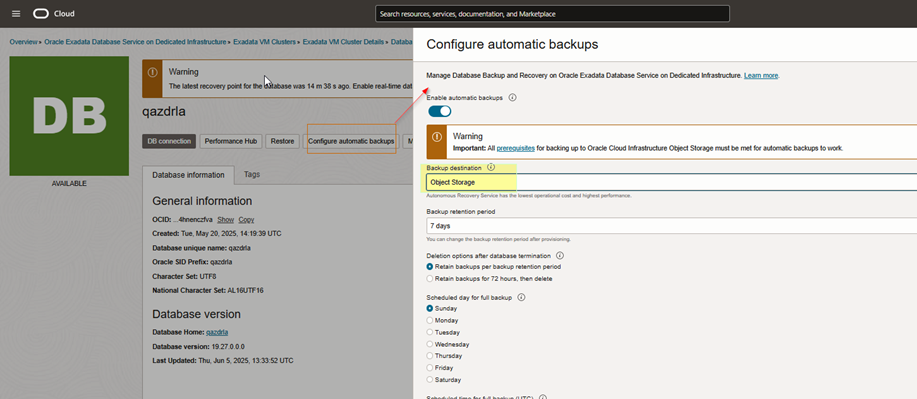
This is where you’ll switch to Autonomous Recovery Service.

Select Autonomous Recovery Service

Under the backup destination options:

  • Choose Autonomous Recovery Service
  • Select a Custom Retention Policy (recommended for immutability and governance requirements).
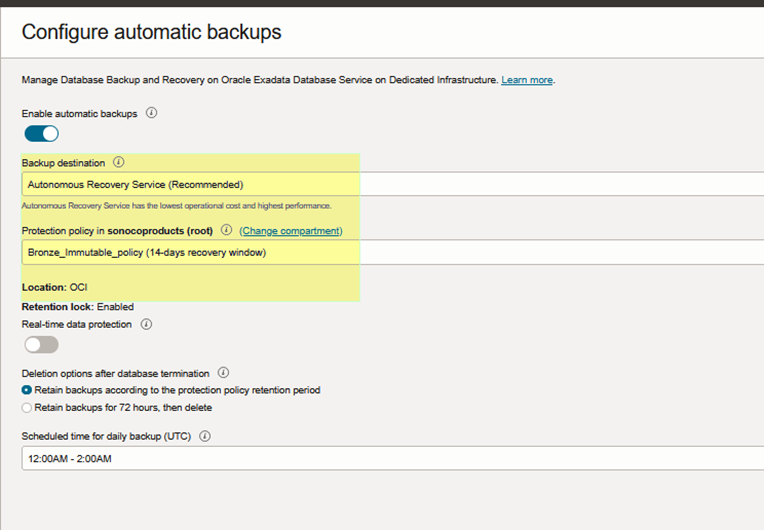
NOTE:
Enabling Autonomous Recovery Service will initiate the first backup immediately. The system will then submit a work request to update the database, which may take a couple of hours to complete.

Verification Steps

After enabling the service, verify the backup configuration.

Confirm Backup Destination

Verify that:

  • Backup destination is updated to DBRS (Previously it may have shown: backupDestination=oss)
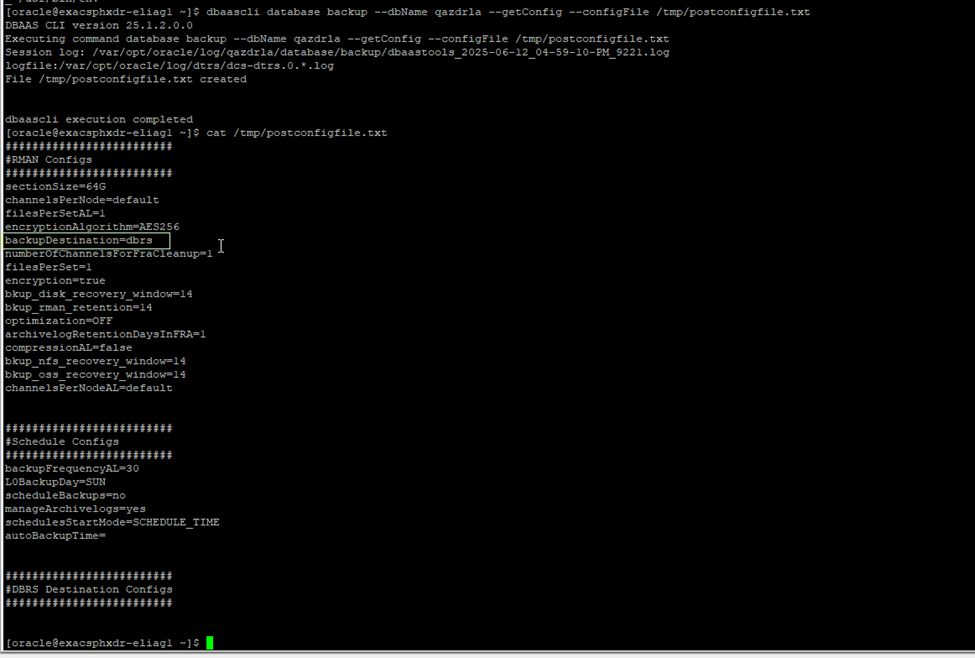
This confirms the migration from Object Storage to Autonomous Recovery Service.

Verify TNS Entries


•	Check if new TNS entries are added for ZDRLA appliances.
•	Look for the following in the TNS admin directory:

IFILE=/var/opt/oracle/dbaas_acfs/qazdrla/dbrs/tnsnames.ora
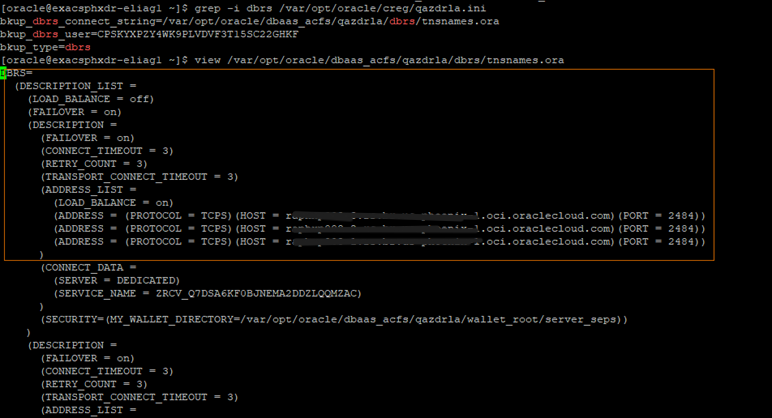


Presence of this file confirms the database is now configured to use ZDLARS connectivity.

Validate Backup Execution

  1. Navigate to the Backups section.
  2. Confirm new backups are completing successfully under Autonomous Recovery Service.
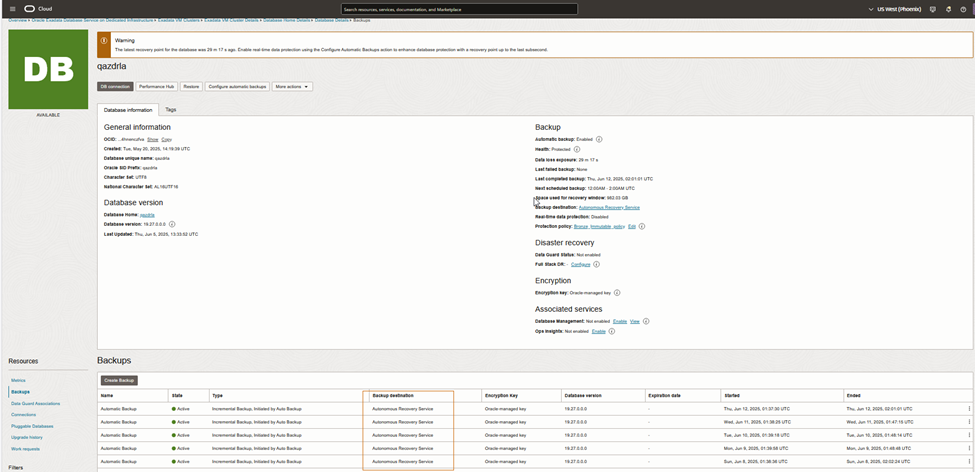
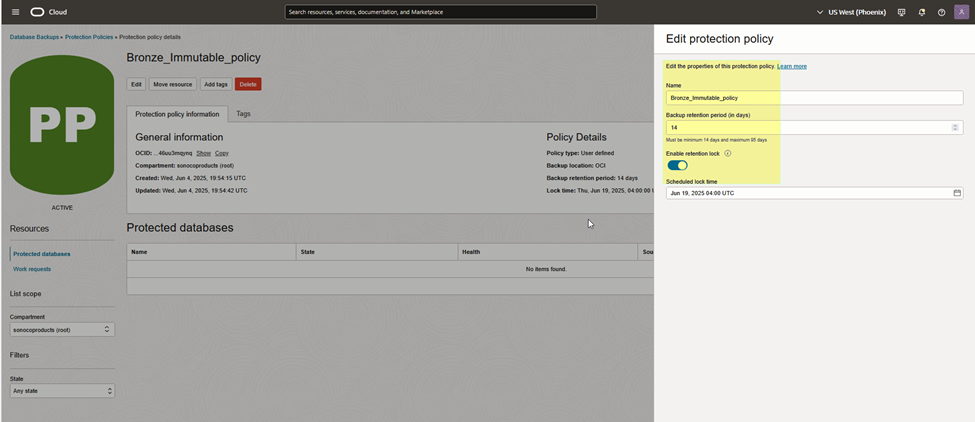
Optional: Enable Retention Lock (Highly Recommended)For enhanced ransomware protection – Immutable Backup

Step 1 – Create a New Backup Policy

  1. Go to Backup Policies
  2. Create a new policy
  3. Enable Retention Lock

Retention Lock ensures:

  • Backups cannot be modified
  • Backups cannot be deleted
  • Protection remains enforced until retention period expires

Step 2 – Apply the Policy

Assign the retention-locked policy to your database backup configuration.

This is especially critical for:

  • Healthcare organizations
  • Financial services
  • Regulated industries
  • Enterprises concerned about insider threats

Why This Matters

Traditional backups protect against hardware failure.
ZDLARS protects against:

  • Ransomware attacks
  • Insider threats
  • Accidental deletion
  • Regulatory non-compliance
  • Data corruption

By separating backup storage into an isolated fault domain and enforcing immutability, Oracle significantly reduces recovery risk.

Final Thoughts

Enabling Zero Data Loss Autonomous Recovery Service is one of the most impactful security upgrades you can implement in OCI for Oracle databases. It transforms backup from a passive safety measure into an active cyber-resilience strategy.

If you’re managing production workloads in OCI, especially mission-critical systems, this configuration should be part of your standard database hardening checklist.

Source

Overview of Oracle Database Autonomous Recovery ServiceZero Data Loss Recovery | OracleIntroducing the Oracle Database Zero Data Loss Autonomous Recovery Service

Understanding Oracle Fusion Cloud Application Maintenance: Quarterly Updates, Monthly Patching, and Exception Patches Explained.

Oracle Fusion Cloud Applications follow a structured and predictable maintenance model designed to balance innovation, stability, and operational continuity. Understanding the differences between quarterly updates, optional monthly patching, and exception patches is critical for effective planning, testing, and risk management. This article provides a practical overview to help IT and business stakeholders navigate Oracle Fusion maintenance with confidence.

Oracle Fusion Maintenance – Quarterly Updates.

Quarterly updates are mandatory for all Oracle Fusion Cloud environments. These updates deliver cumulative content, including:

  • Bug fixes
  • Security patches
  • New features
  • Functional enhancements

Oracle assigns each environment to a quarterly update cohort, which determines when maintenance occurs.

Quarterly Update Cohorts

  • Cohort A: February, May, August, November
  • Cohort B: March, June, September, December
  • Cohort C: April, July, October, January

Stage environments are patched on the first Friday of the update month, followed by production environments on the third Friday, approximately two weeks later. Cohort alignment is especially important to avoid conflicts with internal freeze periods like month-end, quarter-end, or year-end business cycles.

Quarterly updates follow a standardized naming convention (e.g., 24A, 24B), making it easier to track functional and technical changes over time. Quarterly update names combine the year and A, B, C or D. For example, the release for the first quarter of 2023 is 23A; the release for the second quarter of 2023 is 23B; and the release for the first quarter of 2024 will be 24A.


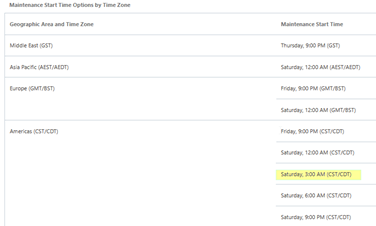
Maintenance start time – Start times are available for the following geographic areas.


Monthly Maintenance Patching: Optional Bug Fixes Between Quarters

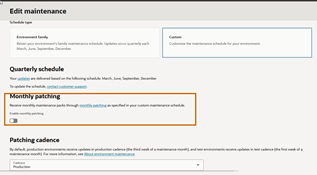
Monthly maintenance packs are optional and deliver bug fixes only, they do not include new features or enhancements. Quarterly updates already contain cumulative fixes. Therefore, monthly patching is disabled by default. It can be enabled in the console if needed under the Edit Maintenance section.

Once enabled, the patches will continue to be delivered each month until Monthly Patching is turned off. Please note that Monthly Patching can be enabled or disabled up to 10 days before the first Friday of the month in which you want the monthly maintenance cycle to start or stop.  Once enabled, Patching is not on demand, it will align with the standard monthly cadence: 1st Friday of the month for stage, 3rd Friday of the month for Production

Oracle recommends enabling monthly patching only when absolutely necessary, like when critical defects can’t wait until the next quarterly update.

Key considerations include:

  • Additional planned outages
  • Increased testing and coordination effort
  • Potential impact to environment refresh schedules
  • Fixed cadence (patching is not on demand)

Exception Patches: Targeted Fixes for Critical Issues

Besides quarterly updates and monthly maintenance packs, Oracle provides Fusion Exception Patches for critical or high-impact issues that require immediate remediation.

Exception patches are:

  • Issued outside the standard quarterly or monthly maintenance cycle
  • Targeted and issue-specific, addressing a defined defect or risk
  • Typically applied only when Oracle determines the issue is severe, like data corruption, security vulnerabilities, or significant business disruption

Unlike monthly patching, exception patches are:

  • Not customer-initiated or scheduled on demand
  • Delivered at Oracle’s discretion after validation and approval
  • Often applied during a separate, Oracle-coordinated maintenance window

Because exception patches fall outside the regular cadence, they may require:

  • Expedited testing
  • Additional stakeholder communication
  • Close coordination between Oracle Support and customer IT teams

Exception patches are generally documented through Oracle Support (SRs and KB notes) and may later be included in a future quarterly update as part of cumulative fixes.


Maintenance Timing and Notifications

Oracle provides automated email notifications to ensure customers are informed about all maintenance-related activities, including:

  • 30 days before maintenance
  • 7 days before maintenance
  • Completion of maintenance
  • Any extensions, rescheduling, or cancellations

For customers in the Americas region, maintenance typically begins at 3:00 AM CST, minimizing business impact while maintaining consistency.


Environment Refresh Rules and Restrictions

Oracle enforces strict rules around environment refreshes to protect system integrity:

  • Source and target environments must be on the same patch level
  • A target environment can only be refreshed once every 7 days
  • Refreshes are restricted:
    • Within 5 days before maintenance
    • 1 day after maintenance begins
    • Between environments with different maintenance dates
  • Maintenance policy changes are restricted 10 days before maintenance

Enabling monthly patching or applying exception patches may further limit available refresh windows, requiring rescheduling of planned activities.


Functional Freeze Before Maintenance

Seventy-two hours prior to maintenance, Oracle restricts updates to certain predefined setup data. During this period, users attempting restricted changes will receive a message indicating that predefined data cannot be updated during application maintenance. This functional freeze ensures a stable baseline for maintenance execution.


Planning for Success

Successfully managing Oracle Fusion maintenance requires coordination across IT, business, and Oracle Support. Best practices include:

  • Selecting the appropriate quarterly cohort to align with business calendars
  • Limiting monthly patching to high-need scenarios
  • Understanding the role and impact of exception patches
  • Planning testing cycles around stage and production timelines
  • Accounting for refresh and functional freeze restrictions

By proactively managing quarterly updates, monthly patching, and exception patches, organizations can minimize risk, maintain system stability, and fully leverage the ongoing innovation delivered through Oracle Fusion Cloud Applications.


Reference documents:

Understanding Environment Maintenance – https://docs.oracle.com/en-us/iaas/Content/fusion-applications/plan-environment-family.htm#about-env-maintenance

Oracle Fusion Cloud Applications Suite Known Issues and Maintenance Packs KB170336

Oracle Applications Cloud – Fusion Applications Update Policy KB160632

Useful Blogs: