With the recent migration to the new Oracle Support portal, many users across the community have experienced significant challenges. Previously favorited knowledge articles are no longer accessible, and several long-standing reference documents cannot be located through search. As a result, user frustration has been growing, with some expressing concern that the transition suffered from inadequate planning and insufficient readiness for go-live.
Oracle has positioned the updated My Oracle Support (MOS) portal as an improved experience, offering several new capabilities, including:
We recommend searching by title or distinctive phrases. Use quotes for exact matches (“Apply Patch 19c”) and add product and version to narrow results (“E-Business Suite 12.2”). Then refine with filters such as product or service and language.
Use your browser bookmark or saved URL for the legacy My Oracle Support article. It should redirect to the new article. After it opens, update your browser bookmark and any internal documentation links to the new URL. If the redirect fails, remove any anchor (for example, #section) and try the base article link.
If you know the legacy Doc ID (for example, 2118136.2), enter it in search. The results will include items that reference that Doc ID, including the primary article. If the article you need is not in the initial results, click “View more” under Knowledge Results or add a keyword from the title.
If needed, use the Top 50 mapping table at the bottom of the page to find the new Article ID, and update any browser bookmarks and internal links to the new article URLs.
Need help?
If you cannot locate an article, reach out to Oracle Support by phone or connect with a support agent via My Oracle Support Chatbot.
Oracle Fusion Cloud Applications follow a structured and predictable maintenance model designed to balance innovation, stability, and operational continuity. Understanding the differences between quarterly updates, optional monthly patching, and exception patches is critical for effective planning, testing, and risk management. This article provides a practical overview to help IT and business stakeholders navigate Oracle Fusion maintenance with confidence.
Oracle Fusion Maintenance – Quarterly Updates.
Quarterly updates are mandatory for all Oracle Fusion Cloud environments. These updates deliver cumulative content, including:
Bug fixes
Security patches
New features
Functional enhancements
Oracle assigns each environment to a quarterly update cohort, which determines when maintenance occurs.
Quarterly Update Cohorts
Cohort A: February, May, August, November
Cohort B: March, June, September, December
Cohort C: April, July, October, January
Stage environments are patched on the first Friday of the update month, followed by production environments on the third Friday, approximately two weeks later. Cohort alignment is especially important to avoid conflicts with internal freeze periods like month-end, quarter-end, or year-end business cycles.
Quarterly updates follow a standardized naming convention (e.g., 24A, 24B), making it easier to track functional and technical changes over time. Quarterly update names combine the year and A, B, C or D. For example, the release for the first quarter of 2023 is 23A; the release for the second quarter of 2023 is 23B; and the release for the first quarter of 2024 will be 24A.
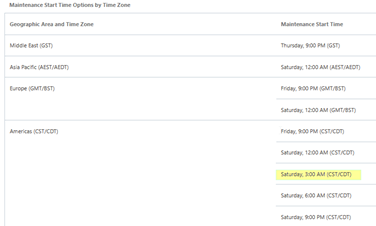
Maintenance start time – Start times are available for the following geographic areas.
Monthly Maintenance Patching: Optional Bug Fixes Between Quarters
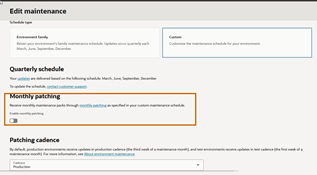
Monthly maintenance packs are optional and deliver bug fixes only, they do not include new features or enhancements. Quarterly updates already contain cumulative fixes. Therefore, monthly patching is disabled by default. It can be enabled in the console if needed under the Edit Maintenance section.
Once enabled, the patches will continue to be delivered each month until Monthly Patching is turned off. Please note that Monthly Patching can be enabled or disabled up to 10 days before the first Friday of the month in which you want the monthly maintenance cycle to start or stop. Once enabled, Patching is not on demand, it will align with the standard monthly cadence: 1st Friday of the month for stage, 3rd Friday of the month for Production
Oracle recommends enabling monthly patching only when absolutely necessary, like when critical defects can’t wait until the next quarterly update.
Key considerations include:
Additional planned outages
Increased testing and coordination effort
Potential impact to environment refresh schedules
Fixed cadence (patching is not on demand)
Exception Patches: Targeted Fixes for Critical Issues
Besides quarterly updates and monthly maintenance packs, Oracle provides Fusion Exception Patches for critical or high-impact issues that require immediate remediation.
Exception patches are:
Issued outside the standard quarterly or monthly maintenance cycle
Targeted and issue-specific, addressing a defined defect or risk
Typically applied only when Oracle determines the issue is severe, like data corruption, security vulnerabilities, or significant business disruption
Unlike monthly patching, exception patches are:
Not customer-initiated or scheduled on demand
Delivered at Oracle’s discretion after validation and approval
Often applied during a separate, Oracle-coordinated maintenance window
Because exception patches fall outside the regular cadence, they may require:
Expedited testing
Additional stakeholder communication
Close coordination between Oracle Support and customer IT teams
Exception patches are generally documented through Oracle Support (SRs and KB notes) and may later be included in a future quarterly update as part of cumulative fixes.
Maintenance Timing and Notifications
Oracle provides automated email notifications to ensure customers are informed about all maintenance-related activities, including:
30 days before maintenance
7 days before maintenance
Completion of maintenance
Any extensions, rescheduling, or cancellations
For customers in the Americas region, maintenance typically begins at 3:00 AM CST, minimizing business impact while maintaining consistency.
Environment Refresh Rules and Restrictions
Oracle enforces strict rules around environment refreshes to protect system integrity:
Source and target environments must be on the same patch level
A target environment can only be refreshed once every 7 days
Refreshes are restricted:
Within 5 days before maintenance
1 day after maintenance begins
Between environments with different maintenance dates
Maintenance policy changes are restricted 10 days before maintenance
Enabling monthly patching or applying exception patches may further limit available refresh windows, requiring rescheduling of planned activities.
Functional Freeze Before Maintenance
Seventy-two hours prior to maintenance, Oracle restricts updates to certain predefined setup data. During this period, users attempting restricted changes will receive a message indicating that predefined data cannot be updated during application maintenance. This functional freeze ensures a stable baseline for maintenance execution.
Planning for Success
Successfully managing Oracle Fusion maintenance requires coordination across IT, business, and Oracle Support. Best practices include:
Selecting the appropriate quarterly cohort to align with business calendars
Limiting monthly patching to high-need scenarios
Understanding the role and impact of exception patches
Planning testing cycles around stage and production timelines
Accounting for refresh and functional freeze restrictions
By proactively managing quarterly updates, monthly patching, and exception patches, organizations can minimize risk, maintain system stability, and fully leverage the ongoing innovation delivered through Oracle Fusion Cloud Applications.
Attending and presenting at Oracle AI World for the first time was an insightful and inspiring experience that deepened my understanding of how AI is transforming enterprise technology. The sessions highlighted practical applications from automating business processes to enhancing data-driven decision-making and reinforced Oracle’s commitment to responsible and ethical AI adoption.
I especially valued hearing from industry experts on integrating AI with Oracle Cloud and E-Business Suite to drive efficiency, innovation, and scalability. The event showcased how AI is not just a technological advancement but a strategic enabler for future growth.
Oracle did a phenomenal job organizing the conference from engaging keynote sessions and sponsor/vendor booths to hands-on labs, expert panels, and networking meetups all while accommodating over 25,000+ attendees. The experience concluded on a high note with an incredible Def Leppard concert, making the entire event both impactful and unforgettable.





 DBA365